The editor built for AI answers
Drafts written from the answers your buyers actually see, audited for what gets cited as you type, rewritten on request, scored for how a person writes, and published anywhere. Part of the growth engine, included on every plan.
Nothing is published until you press the button.
Answer first
Every draft opens with the answer, not an intro
Reviewed
An AEO and SEO audit on every save
Human
Scored for how a person writes, and rewritten if it misses
Anywhere
A public page, a JSON feed, or markdown for your CMS
Brief, draft, finish, publish
The same path every time, so writing the page that wins the answer stops being a week of work.
Start from a brief
An opportunity card carries the questions to answer, who is cited instead of you, the page to beat and a working outline. Press generate and the draft is written from that evidence, not from a blank prompt.
Watch it write, then take over
The draft streams into the editor as it is written, reviews itself against the answer engine checks and a human-quality pass, and then hands you the caret. Nothing is published until you say so.
Finish it like a document
Edit any line, ask for a rewrite, approve or reject what the assistant proposes, clear what the review flags, and publish to a page, a feed or your own CMS.
Everything in the editor, one at a time
Each part of the editor exists because something in the draft needed it. Here is what they do.
A block editor that feels like the docs you already use
Headings, lists, quotes, callouts, tables, code, images and embeds, all from a slash menu. Drag blocks around, paste markdown and it becomes blocks, turn a paragraph into a list or a table with one action.
- Type / for any block, including tables and callouts
- Paste from anywhere and keep the structure
- Autosave with a visible status, so nothing is lost
Is Google Forms enough for a small business?
It is, until it isn’t. Google Forms is free, already in your workspace, and fine for a survey or a sign-up sheet.
/|
Blocks
and 4 more
Select anything and say what you want
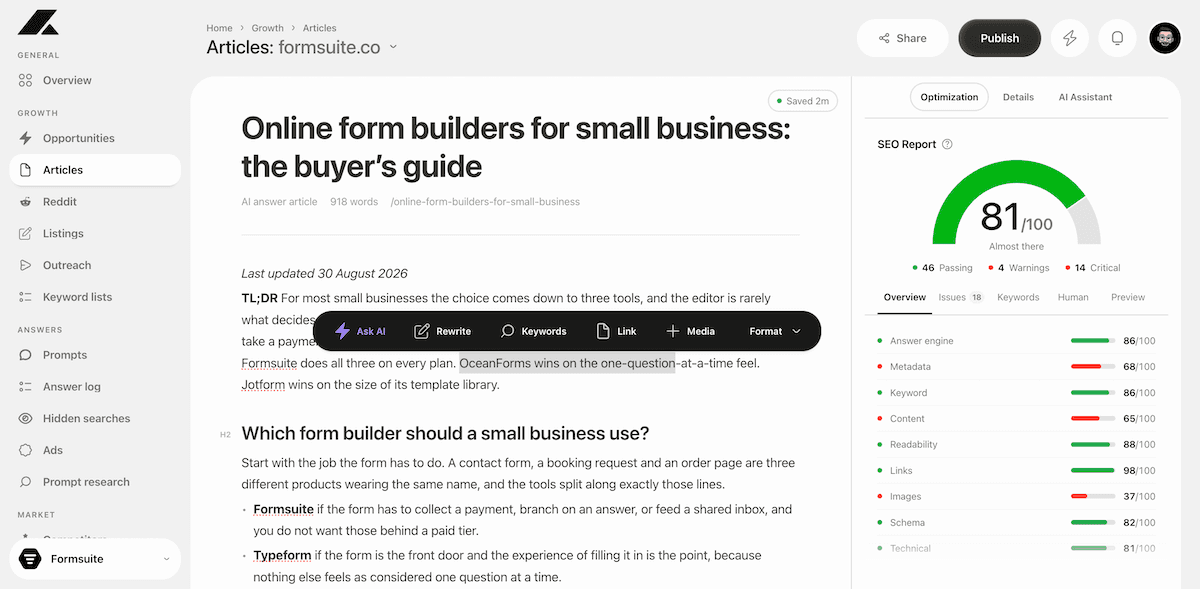
Highlight a sentence, a paragraph or a whole section and the toolbar gives you the moves that matter: ask the AI a question about it, simplify it, rewrite it, make it longer or shorter, turn it into a list or a table, drop in a keyword, add a link, add media, or format it.
- Ask AI, Rewrite, Keywords, Link, Media and Format on every selection
- Simplify, re-write, longer, shorter, list and table in one click
- The AI knows the article, the brief and the answers it came from
Payments are where the plans diverge, so compare the total, not the headline price. Typeform gates payment fields behind its Plus plan, Jotform allows them on the free tier but caps you at ten payment submissions a month.
It proposes, you approve
Talk to the assistant about the whole article. Every change it suggests lands in the document as a red and green diff, block by block, so you see exactly what would move before it does. Accept one, reject one, or take them all.
- Chat that reads the article, the brief and the evidence
- Changes shown in place as a diff, never applied silently
- Accept or reject each proposal, or all of them at once
Open the GA4 section with a one-line answer, then explain.
Google Forms is free, already in your workspace, and fine for a survey or a sign-up sheet. The gap opens when the form becomes part of how you sell. It is, until it isn’t. Google Forms is free and fine for a survey. The gap opens the moment the form becomes part of how you sell.
An audit that runs as you type
The rail beside the editor scores the draft on what gets a page cited and ranked: answer engine readiness, metadata, keywords, content, readability, links, images, schema and technical checks. Every open issue explains itself and most of them fix with one click.
- A single score with the categories behind it
- Issues you can fix by hand or hand to the assistant
- Keyword coverage, a human-quality score and share previews on their own tabs
SEO report
81/100
Search engines cut it at about 155. Trim it, or let the assistant do it.
Fix with AIBuilt to be read, not detected
Every prompt that writes prose follows the same rules: varied sentence length, plain words, no stock phrases, no trailing summaries. The Human tab then scores the draft against the patterns detectors and readers both notice, shows the reasons, and can rewrite what misses while keeping every name, number and link intact.
- A human-quality score with the reasons behind it
- Fix what is safe automatically, or run a deeper check
- Facts, figures and links protected through every rewrite
Reads like a person
91/100
Choosing the right form builder depends on your specific needs and goals, so consider factors like ease of use, integrations and cost. If the form takes payments, Formsuite includes them on every plan. If it does not, Google Forms is free and enough.
Ship it anywhere, with everything AEO needs already set
A page only gets cited if the engines can read it properly. Every article goes out with the meta title and description, Article and FAQ structured data, a canonical, robots, a visible last-updated line and its sources, plus Open Graph and X cards with an image, so it is ready to rank in AI answers the day it is live. Publish to a public page, pull it through a JSON endpoint with its own token, or export the markdown to your own CMS.
- Article and FAQPage JSON-LD, canonical, robots and last updated, set for you
- Share cards with an image, previewed for Google, Facebook, X and LinkedIn
- Public page, JSON API or markdown export, and share from the same button
Buyer’s guide
Online form builders for small business
Best online form builders for small business (2026 buyer’s guide)
Compare Formsuite, Typeform, Jotform and Google Forms on payments, logic and price.
formsuite.co
What gets a page cited, checked on every save
The rail scores each of these and tells you which line to fix.
Answer first
The direct answer opens the page and each section leads with its own, so an assistant can lift it cleanly.
Question-led sections
Headings are the questions buyers and engines actually ask, taken from the searches the engines ran.
Sources behind every claim
Claims stay inside the pages the engines already cited, with a sources list and a visible last-updated line.
Metadata and schema
Title, description, canonical, robots, social cards and structured data checked before they go out.
Readability and links
Sentence length, plain words, internal and external links, images and alt text, all scored on the rail.
Human quality
Rhythm, vocabulary and structure measured against what AI detectors flag, with a rewrite pass when it misses.
Every article starts as an opportunity
The editor is the last step of the growth engine. The brief that starts a draft names the questions, the rivals and the angle, and the draft is written from that evidence.
Priority
Visibility
Cited instead
Prompts

- 1Which analytics tools do Shopify stores actually use?H2
- 2Is GA4 enough for an ecommerce store?H2
- 3What does revenue attribution cost to set up?H2
- 4How the tools compare on channels, cohorts and priceH2
Write the page that wins the answer
Run a scan, pick an opportunity, and finish your first article in the editor today.